Wednesday, September 27, 2017

How to Fix Outlook 2010 crashing on startup?

Introduction:

Updating the older version of Outlook to the new Outlook 2010 can be this much annoying, I have never ever think about it. However, the software upgrade always helps to add up more and more advanced facilities in comparison to the previous versions. But, it could freeze the existing facilities of the software often. The similar case was there when I have switched to Outlook 2010. I was trying to start the Outlook profile but Outlook 2010 was not responding. The multiple restart operations also not worked for me and Outlook 2010 kept crashing repeatedly.

Such type of problems are being encountered by Outlook 2010 users. On the other end, such concerns can also show errors like Outlook 2010 PST file is not working. These problems are just to make the PST files unreadable. In this type of cases, you become clueless and keep thinking why Outlook 2010 crashes on startup.

Friday, July 28, 2017

5 Ways to solve ‘This Personal Folders file (.pst) is already in use in the current profile’ Error

Indeed, Outlook is the Microsoft’s flagship email client that is quite useful for communicating as well as offers many other functionalities, such as Contacts, Calendars, Tasks, Journals, and To Do Lists. Yet, there are many instances when it comes up with different error messages limiting the normal functioning of the email client. Well, one of the error messages is as follows: ‘This Personal Folders file (.pst) is already in use in the current profile.’

You can also face this error while working with Outlook when you try to import a PST file. And when such a situation occurs it becomes a priority for you to get it fixed as soon as possible. The simple reason being, the sooner you get it fixed the sooner you will be able to resume your work in Outlook. Fair enough, here in this blog we present to you the 5 best ways to solve this Outlook PST error. But before that let us know the causes that lead to this error. The reason being, the causes play a great role in taking right and corresponding approaches to fix the error.

Monday, April 24, 2017

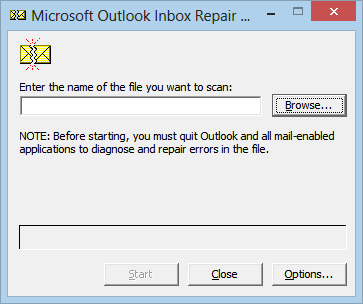
Do You Know How ScanPST.exe is important for Microsoft Outlook users?

Microsoft Outlook is an Outstanding Email platform and working well. It provides users great features like Search Folder, Various rules, Templates to automate the workflow. MS Outlook uses the personal folder that is PST (Personal Storage Table) file to store all the mailbox data which includes Emails, contacts, calendars, Journal, Tasks etc. We have seen a lot of cases face difficult continue their communication via Outlook due to corruption in PST


Let’s see the most common reasons of PST file corruption.

·         The size of PST file grown very large
·         Improper shutdown of Outlook
·         System crash while Outlook is running
·         Storage device failure, Power failure
·         Virus Attack on the PST file

Thursday, March 30, 2017

Top 5 Approaches to fix “The attempted operation failed. An object could not be found” Error

I have spent a whole day to find the fix for this Outlook Error “The attempted operation failed. An object could not be found” and now I have got the troubleshooting steps.

There are many aspects that cause this error like,

·         Outlook is running in compatibility mode,
·         Corrupt Outlook Profile,
·         Corrupt Outlook Data File,
·         Due to usage of bad Antivirus  

Here I have gather 5 tactics to exclude this error.


Monday, February 27, 2017

Multiple Ways to Split Large PST file in Microsoft Outlook

Outlook by default stores all its mailbox data into a single file that is “PST” file. It stands for Personal Storage Table. It is obvious that when the Outlook stores data in PST file the size of the PST will get bigger. User finds it difficult to deal with bigger PST File.


Outlook has set particular size of PST for different version, From Outlook 98 to 2002 the size limitation is 2 GB and from 2003 to 2016 it’s 20GB. Once you reach the PST file size limit, the performance of the Outlook slows down as a result Outlook hangs or freezes during launching. Or sometimes it gets corrupted. Below are some issues that found due to increased size of PST:

Monday, January 23, 2017

Steps to Import MBOX to Outlook 2016 or 2013

Summary: In this editorial, we will discuss all feasibility about the conversion of MBOX file to PST through manual steps. This blog also explains the various limitations of MBOX email client like Thunderbird.

The MBOX is an archive text file which represents through .mbox or .mbx file. This file format supported by various email clients like Mozilla Thunderbird, Apple Mail, Entourage, Sea Monkey, Eudora and many others. As these are the most common email client used by the users. There are almost 25+-email clients having support of MBOX file. 

Monday, December 26, 2016

Solved: The attachment size exceeds the allowable limits in Outlook


Summary: This tutorial helps you to find the root cause of this one error as well as necessary steps to fix this annoying error.
Microsoft Outlook is dominating the email market business. If you are a business user, then you can use it as per your specific requirements. No doubt, MS Outlook provides good features and functions but it limits the size of attachment of 20mb i.e. 20480kb. Whenever you try to attach a file that is greater than its limit, an error prompt “The attachment size exceeds the allowable limits in Outlook 2013”. 

First, Let’s us discuss the root cause of this:
Causes of Error:
There are two main aspects that pose the error which depend on the Email account you are using.

Wednesday, November 23, 2016

Import Outlook Express Contacts to MS Outlook 2007, 2010, 2013


Summary: In this article, you will learn the process to import your contacts from Outlook Express to the different versions of MS Outlook. Along with this, it also focuses on main reasons of migration from Outlook Express to other email programs. 


Reason to Leave Outlook Express:

MS Outlook and Outlook Express are two different email programs under the umbrella of Microsoft Inc. Let’s discuss the key reasons to move on from Outlook Express, such as:

Sunday, October 30, 2016

Tips to Split Large PST File into Smaller Parts

PST file is a hub of all Outlook items like emails, calendars, journals, contacts, task and other entities.  PST (Personal Storage Table) can also consider like a data warehouse of MS Outlook. So, it is necessary to protect the integrity of this Outlook file on high priority.PST file size limit depends on file format as well as the version of MS Outlook. 


Wednesday, July 27, 2016

How Can We Protect PST File from Oversized Error in MS Outlook?

MS Outlook is undeniably an appreciated email program, however, bogs you down with various problems that you fail to fix adequately. 

Consequently, multiple errors occur can report in MS Outlook premises. For e.g.

Outlook.pst cannot be accessed – 0x80040116.

Error code 0x80040116 is for timeout failure which you get when you attempt to send or receive any message in Outlook. 

Tuesday, May 31, 2016

Let US Eliminate Errors of DBX file in Outlook Express

After closing support of Windows XP from Microsoft Inc., It becomes difficult to manage Outlook express mailbox or other components from unwanted threats like errors, bugs, damage in database file etc. In this situation, End users can’t trust on the email system of organization which is relying on Outlook Express. As per current statistics revealed on May 29, 2016, Windows XP comes under top 7 OS with market share 2.99% in North America

To give a sustainable support to Express users, this blog post describes all facets of this one old email application along error solving approach.

Friday, April 29, 2016

How to Backup Outlook PST File in Exchange and Non-Exchange Environment

PST is an Outlook personal folders file that stores all the email and non-mail data. However, the file may become damaged or corrupt due to various reasons and all the data goes lost. Therefore, it is important to create a backup copy of the file so that you can restore data whenever PST encounters corruption. Go through the following to learn how to create mail backup in Outlook.

Thursday, February 25, 2016

Efficient Methods to Fix Corrupt PST File in MS Outlook


Microsoft Outlook is a reliable email client, but something weird things happen with this application.  Sometimes it happens that you receive errors on Outlook, when you try to initiate your Outlook mailbox. You come across many type of errors message but one which is very common is mentioned under:

"Cannot start Microsoft Office Outlook. Cannot open the Outlook window?"

Friday, October 30, 2015

Email Backup : Essential Habit for MS Outlook Users

Emails are precious asset for an organization due to being responsible for containing bulks of business related information, such as privacy, business plans, processes, client relation management etc. Backup is preventive mechanism to make data safer and reliable. Now days, any smart application is enabled with adequate mechanism to handle such cases. It is the best strategy to protect your data against any unfavorable conditions.

Wednesday, October 21, 2015

Windows 8.1 – Gateway for Students, Home and Professionals

This operating system is seen as an evolution of new user interface. It covers vast range of electronic gadgets like desktops, laptops and tablets. This new version of O.S. is dedicated to enhance user's experience rather that minor changes in platform. 

Monday, September 28, 2015

Steps to Backup Emails, Contacts and Items in MS Outlook

Regular Backup always ensures the existence of important data at right time and place. As forgetting the things is the human nature so make the golden rule to take the Outlook backup on regular basis. The overall objective belongs to consider an environment where you have no fear with data loss. The amazing facts regarding this incident are that users have realized the importance of Outlook data in case of file crash. But Most of users have no idea about right methodology for backup especially in Outlook. In unanticipated environment, no one has ability to forecast problems that may be resulted with your working mail application. Data availability is considered on high priority for businesses survival. With safety point of view, you have needed to perform a daily exercise with Outlook backup task.

Wednesday, July 29, 2015

Reset new Password on MS Outlook PST File

In this era of the Internet, emails have become the best mean to carry out internal as well as external communication in the organizations. For smooth email communication most of the organizations use MS Outlook as their email client. MS Outlook is designed in a way that it completely fulfills the requirements of a professional user, like it facilitates a user to maintain a list of contacts, create calendar for his/her assignments, make notes, etc.

Wednesday, June 24, 2015

5 Basic Tips for Email Management in MS Outlook

The prominent feature of Microsoft email client Outlook is its ease, navigation and fast accessibility. This email application lets you a handy approach for carrying entire communication in best pattern. Meanwhile, Outlook provides a wide range of facilities with optimum result but it has also some spotted corners. To manage Outlook is just like a dare to think beyond the limits if you have no advanced utility for critical situations. As you know most of organizations are dependent on email, tasks, contacts and journals for business activities so we adopt such kind of utilities that support all corners of Outlook's castle.

Monday, May 25, 2015

Helpful Guide to Protect MS Outlook Emails from Unknown Error/Corruption


Users have passed nearly a decade experiencing Microsoft Outlook with a goal to benefit their organizations. Outlook has been a good application to facilitate an effective email exchange, however, there are times when users face some abnormal activities within the application or fail to access it. 

The post will outline a major reason of Outlook inaccessibility and methods to prevent the problem, read on to know...

Tuesday, March 31, 2015

The Internet :Addiction and How Do You Overcome it ?


The internet is a part of daily life for pretty much everybody in the Western world. We use it at work; it’s on our smart phones in our pockets; it gives us directions in our cars, and, with the advent of affordable high speed internet, we’re getting these things incredibly fast.

There’s no doubt that the internet benefits us in many ways, but for a certain segment of the population, the internet might be fueling lurking addictions, and even creating new ones. Almost all of us have turned our computers on to check email, a bank statement or to find the name of a restaurant, only to find that we were still looking at our computer screens long after we’ve learned what we wanted to know. 

Text Widget

Related Posts Plugin for WordPress, Blogger...